

Pag-IBIG Fund’s Modified Pag-IBIG II (MP2) is a voluntary, five-year savings program for members who want to save more than the regular Pag-IBIG contribution and earn a higher, tax-free dividend. The minimum remittance is ₱500, there is no maximum, and you can open more than one MP2 account.
Recent declared MP2 dividend rates have been higher than Regular Savings. Pag-IBIG lists these MP2 return rates: 7.12% (2025), 7.10% (2024), 7.05% (2023), 7.03% (2022), and 6.00% (2021). Rates are declared after each year based on the Fund’s performance; they are not a fixed guarantee.
You can open an account online (fastest) or at any Pag-IBIG branch.
Pag-IBIG warns public vs. scammers using execs’ names – www.adfiap.org
Who can open MP2
MP2 is open to:
- Active Pag-IBIG members (regular/mandatory savings)
- Former members who are retirees or pensioners, with another source of monthly income and at least 24 monthly savings before retirement
- Natural-born Filipinos who reacquired Philippine citizenship under RA 9225, with at least 24 monthly savings before permanent migration
You must already have a Pag-IBIG Membership ID (MID) number. If you do not have one yet, register first through Virtual Pag-IBIG.
What to prepare
Always needed
- Your 12-digit Pag-IBIG MID
- One valid government ID (photocopy or scan) — PhilID, passport, driver’s license, UMID, PRC ID, voter’s ID, and other IDs Pag-IBIG accepts
- Selfie holding your ID (for online enrollment)
- Active mobile number and email
As applicable
- Proof of income / source of funds — required for a single remittance over ₱100,000
- Philippine passport and Certificate of Reacquisition/Retention of Philippine Citizenship — for former natural-born Filipinos
- Initial savings of at least ₱500 when you start depositing
A single remittance over ₱500,000 must be paid by personal or manager’s check.
Option 1: Open MP2 online (recommended)
Official starting points:
- Virtual Pag-IBIG: pagibigfundservices.com/virtualpagibig
- MP2 page on the main site: pagibigfund.gov.ph/member_savings_mp2.html
Step-by-step
- Go to Virtual Pag-IBIG.
- Click Be A Member, then Apply for MP2.
- Read the requirements list, tick Data Privacy and Terms and Conditions, and proceed.
- Validate your membership: enter MID, last name, first name, and birthday exactly as they appear in Pag-IBIG records.
- Fill in contact details. You will typically receive an OTP on your registered mobile number.
- Enter your desired savings amount, preferred dividend payout (annual cash-out or compounded until maturity), mode of payment, and source of funds.
- Submit. You should receive a 12-digit MP2 account number. Save or print the enrollment form/PDF. That number is what you use for every deposit.
Enrollment is free. Use only official Pag-IBIG websites. Do not pay anyone to “process” your MP2.
If you choose salary deduction, give your employer a copy of the accomplished MP2 Enrollment Form so they can remit for you.
Option 2: Open MP2 at a Pag-IBIG branch
- Download or get the MP2 Savings Enrollment Form (HQP-PFF-226) from the Pag-IBIG website or the branch.
- Fill it out with your personal details, MID, preferred contribution, payment mode, and dividend option.
- Bring a photocopy of one valid ID (and proof of income if your planned remittance is large).
- Submit at any Pag-IBIG Fund branch. You can pay the first ₱500 (or more) the same day and get your MP2 account number.
Mall and selected standalone branches are often open on Saturdays. Check the official Pag-IBIG site or Facebook page for the current list before you go.
After you have an MP2 number: how to save
You can start saving as soon as the account number is issued. Minimum is ₱500 per remittance. You may pay irregular amounts, monthly, or a lump sum for the five-year term.
Common channels:
- Virtual Pag-IBIG → Pay Online → MP2 Savings
- GCash, Maya, and other accredited online partners
- Over-the-counter at a Pag-IBIG branch
- Accredited collection partners (examples often cited include Bayad, SM Business Services, ML Kwarta Padala, and partner banks)
- Salary deduction through your employer
Use your MP2 account number, not only your MID, when paying MP2.
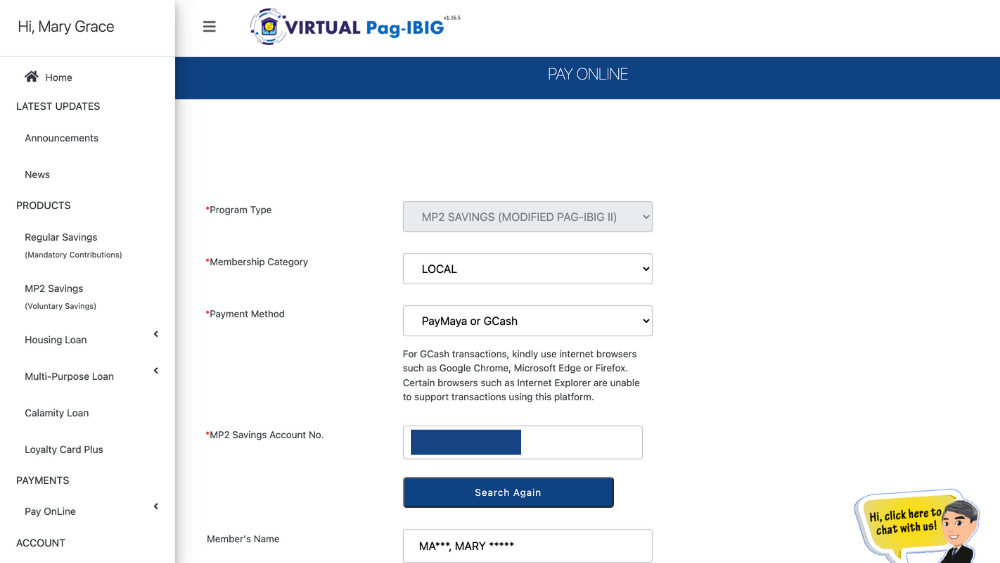
How to Apply for Pag-IBIG MP2 Savings Account Online » YugaTech | Philippines Tech News & Reviews
Deposits usually post within a few business days. Keep receipts until the amount appears in Virtual Pag-IBIG.
Choose your dividend option carefully
When you enroll you pick one of two payout styles:
- Annual payout — dividends are released each year after the rate is declared
- Compounded — dividends stay in the account and earn on top of previous earnings until the five-year maturity
Compounding usually grows the balance more over five years. Annual payout is better if you want cash flow every year.
The five-year term starts on the date of your first payment, not the date you generated the MP2 number. At maturity you withdraw principal plus dividends, or you apply for a new MP2 account if you want to continue. Unused matured MP2 does not keep earning the MP2 rate forever.
You may open multiple MP2 accounts. Some savers “ladder” accounts (open a new one each year) so money becomes available on a rolling schedule.
Early withdrawal
Pre-termination before five years is limited to specific cases in Pag-IBIG’s terms, such as total disability or insanity, separation from service for health reasons, or death of the member or an immediate family member. Ordinary “I need the cash” withdrawals are not the design of the program. Confirm current grounds on the official MP2 terms before you treat it as an emergency fund.
How to monitor the account
Create or log in to a Virtual Pag-IBIG account, then open the MP2 Savings section to view balance and history. The mobile app is also available on Google Play and the App Store.
Keep a screenshot of your MP2 number and enrollment confirmation.
Practical tips
- Match your name and birthday to Pag-IBIG records. Small spelling differences often fail validation.
- Prefer compounding unless you need yearly cash.
- For amounts over ₱100,000 in one remittance, prepare proof of source of funds in advance.
- MP2 is separate from Regular Savings. Loan eligibility still depends on your regular (MP1) contributions, not MP2.
- Enrollment and official payments are free. Anyone asking for a “processing fee” to open MP2 is a red flag.
Official links
- MP2 overview: https://www.pagibigfund.gov.ph/member_savings_mp2.html
- Virtual Pag-IBIG: https://www.pagibigfundservices.com/virtualpagibig/
- Pag-IBIG online services hub: https://www.pagibigfundservices.com/
Rates, forms, and partner payment lists can change. Use the official pages above as the final check before you enroll or send a large remittance.